Showing posts with label WordPress. Show all posts

Sunday, 3 March 2013

How to Make Your WordPress or Blogger Blog DoFollow


How to Make Your WordPress or Blogger Blog DoFollow

What does becoming DoFollow mean? It simply means that you are allowing each commenter’s links in your comments section to be nofollow free. It is like a reward to the people who take the time to leave a comment on your website, allowing their links to be fully useful when search engines crawl your post.
So how do you make your blog DoFollow?
Self-Hosted WordPress Blogs
For self-hosted WordPress users, it is pretty easy. Simply go to your Dashboard > Plugins > Add New and search for DoFollow. You should receive a list of current DoFollow plugins that you can simply install and activate. Once activated, these plugins automatically make all of the commenters’ links (past and future) DoFollow.

Tuesday, 26 February 2013

Regular Maintenance is Critical for your Blog

Regular Maintenance is Critical for your Blog:

Do you take a day every week, month or a few times a year to make sure you are doing all you can to maximize your blog?  I believe a successful blog should be treated like a business.  Every so often you should schedule time to regroup and refresh your blog.

Let me give you an inside peek into what I do to stay on top of my blog.

1.  I sign out of my blog,  then I go to my blog site to see how everything looks from a reader’s perspective.  I want to make sure that things pop up correctly, that the page loads quickly and I will leave a comment, to make sure the process is easy.

Free Critique of your Blog

Free Critique of your Blog:

I have gotten so many requests to look over my reader’s blogs that I have decided to create a special opportunity.

I will be putting up another page on this blog.  If you would like your blog critiqued, please place your link on the critique page with a sentence about what you would like me to look at.  It’s fine if you just want me to look over your blog in general because you are just starting out.  If you have a specific question, just write it in the comment section with your link.

Battle of Blogging Titans: WordPress vs. Blogger

Battle of Blogging Titans: WordPress vs. Blogger:


WordPress and Blogger – if you have been an ardent blogger, you probably have heard these two names zillions of times. And you might be aware of the battle of these titans as well. Being posed with two of the most popular blogging platforms, bloggers are at time perplexed with the big question- which is superior of both the blogging platforms? Both platforms offer a plethora of benefits but if you have recently ventured into the blogging arena then probably you are awaiting for an answer to choose a favored platform to write upon.


How Does Google reward creativity?

How Does Google reward creativity?

An idea is born. The juices are flowing, and you can’t wait to unleash your newest Internet adventure.

The marketing process starts with the first line of code. Correction: It starts before the first line of code.

Combining great content, a diverse search engine optimization strategy, a creative website and many other aspects of online marketing is what brings success in the long run. But you’ve got to have the missing ingredient: Creativity.

Google has an absolute spooky knack for finding quality on the Internet. And here’s a big clue: “quality” is usually answering a question to somebody’s problem. In this post, we’ll look at how to define creativity in marketing and discover how Google rewards that creativity.

Monday, 25 February 2013

How to Find Guest Bloggers to Write Guest posts on your blog?


This is a part of Question and Answer round. If you have any question on Blogging, WordPress, SEO, shoot me an Email at admin[at]shoutmeloud.com.
This question is asked by Rahul:
Hi harsh, I want guest bloggers for my blog. Can you suggest how I may get guest bloggers?
Guest blogging has it’s own advantages and disadvantages. Though the no. of advantages outrun the disadvantages and many bloggers have started offering guest posts on their blog.  By guest posting, most clear advantage for guest author is they will get free backlinks, free traffic and subscribers. Here I’m sharing few points which work for me and should work for you to appeal bloggers to guest post on your blog.
Where to find guest bloggers for your blog?

Build a community:

How to Get Targeted Traffic Without Google


We all knew how importance is getting traffic to a blog or a business page. Most of us also knew how much it`s important to get targeted traffic to blog than untargeted one. Without targeted traffic you can`t make a single dime out of your blog. Major traffic for many blogs comes from search engines, of-course from Google. But from last 12 months we`ve seen drastic change in Google`s nature which forced all the blog owners to bind them to Google`s rules. Anyway I don`t have hard feelings with Google. I agree they`re striving hard to give relevant and quality content to users.
If you`re thinking that without Google you can’t survive your online business then you’re wrong.
Best example is JohnChow.com, site earning increased even after Google penalized it.
So, I too started thinking how can I start a business without relying on Google. This paved me to write this post. Here I’m sharing few traffic generation tips for Websites or blogs without being dependent on SEO or Search engines.
How to get traffic without Search engine Optimization?

Where To Spend Money For Your Blog Growth


I’m a strong believer of proverb “Money makes money“. You need to spend money to make money. Be it blogging or any business, money which you spend is always an investment. We all know, blogging is also a business, if you are making money and if you are not doing anything to promote, grow your blog, you are not doing justification with your blog business. To start a blog, there are few initial investments, which are necessary but after a time, you need to do few things to take your blog to next level.
6 ways to earn money from Internet without investment
Few years back, when ShoutMeLoud was growing, and I had enough money to spend on my blog growth, I was stuck. I had no idea, where should I start from. I had a handful of money, and I wanted to invest it on the best ways possible. That’s like 2 years back, and since then I have spent money on daily basis, and some of them are still giving me best return of the investment. If you are one of those blogger, who is working hard on your blog and now looking to take your blog to next level, here are few ideas which will help you to grow your blog.

What Kind of Content Drive Traffic and Natural Backlinks


Traffic is the most desired thing that unites all bloggers, whether beginner or expert. But the question is : which kind of articles should you write in order to get a high number of backlinks and increase traffic to your blog?
Questions like this are a classic in the daily work of a blog writer and owner : the vastness of the web and the overabundance of content in it produce a cut-throat competition, ensuring that only the most interesting and noteworthy content can generate a significant traffic. Therefore, you can take inspiration from these different ways to receive traffic, backlinks and online visibility : provided, of course, that you follow the correct rules.
How to increase traffic from Email subscribers
3 ways to increase traffic to your Website
Content which drives traffic and Backlinks:
1. Increase Blog Traffic with Collection of Resources

How Much it Cost to Start a Self Hosted WordPress Blog?


Everyone knows that hosting your own blog is a costly affair and this question comes to everyone who just started with Blogging or plan to start with their own self hosted blog. How much it’s going to cost to create a self hosted WordPress blog. In this post, I will point out some of the cost which is involved in the process of set up a WordPress blog.

Cost to starting a self hosted WordPress blog
WordPress is one of those platform, where you can start at minimal cost. WordPress software is free and you can download it for free from WordPress.org page. Though, there are some requirements like a domain name, a hosting space which you have to pay for. after that it depends upon your requirement, how much you wish to spend on customization, SEO and other factors.
If your interest is just to start a blog on WordPress, you can start with minimal cost of $60 for an unlimited hosting and domain with Bluehost and Dreamhost. You can learn about all such hosting which is best for WordPress here.
Domain: Cost: $10

Why You Should Not Migrate From Blogger To WordPress ?


WTF! read the title again.
Doesn’t it sound unique, the heading is just opposite to the ones you might have read on other blogs. In this article we are going to discuss the benefits of  Blogspot platform. We will go through the points in which blogspot is better than WordPress.
Ask a professional blogger, which platform should I choose?
Most of them will suggest you to choose self hosted WordPress. I don’t want to say they are wrong but with all due respect they are not totally right.
If you blog for fun or you are just a beginner then choose blogger but if you want to go professional then choose WordPress. We have already got the reasons covered and if you missed it, here are few articles to help you:
Why WordPress is better than BlogSpot platform
Why WordPress is best Blogging platform at this moment
Most bloggers live with the above thought. WordPress is an open source CMS (content management system) for blogging which is used by millions of bloggers and it’s everyone’s first choice but BlogSpot platform has its own benefits. Before going through my favorite features let us see a few facts about Blogger.
Number of blogs = 100 blogs per account.
Number of labels = 2,000 unique labels per blog, 20 unique labels per post
Number of pictures = Up to 1 GB storage and all the images are stored in Picasa
Number of posts = Unlimited.
Static Pages = 20 stand-alone pages.
Authors = 100 per blog.
Size of pages = Individual pages (the main page of a blog or archive pages) are limited to 1 MB
Size of pictures = Pictures are scaled to 1600px

Migrating from Blogger to WordPress


Hey everyone! 

This all feels so strange. After 4 years of dedication to Blogger, I have decided to make the leap (..slow, tedious dragging of my feet) to WordPress. It was extremely agonizing at first – mostly because I was so terrified of losing content but also because I didn’t want to lose any my followers or my SEO rankings.

But I put my big girl pants on and here we are! Starlit Corner* on WordPress. HOORAY! 

First things first.

Content transfer is pretty easy because both Blogger and WordPress allow for easy export/import. So if you’re thinking about migrating like me, don’t worry too much about that. When it comes to picking a theme, remember that you can’t customize the width of your columns in most themes so pick carefully! Especially if you’ve uploaded photos – I found that some themes would cut off my photos or change the image size and distort the picture.

Step by step.

1. Open a WordPress account and set up your profile and domain.

2. In your dashboard, navigate to ‘Tools’ and select ‘Import’.

3. Select the ‘Blogger’ option and authorize permission for WordPress to collect and copy your files.

4. A list of your Blogger blogs should appear and you select which you would like to import.

Now the difficult part. Obviously when you transfer your blog, your links change and you lose your stats and Google rankings.

I have found a couple websites showing me how to redirect traffic from my Blogger page to here but I want to be sure about it before I start fiddling with the HTML template. So if anyone knows of a reliable site to direct me, I would reeeeally appreciate it.

5 SEO IDEAS FOR WORDPRESS.COM BLOGGERS

English: The logo of the blogging software Wor...


I live a life inspired. That is my self-governing mantra. (Om.) I recently thought, ‘Hey, why not live like…I’m freshly pressed?’…Then after that, I just chuckled, rolled over and went back to sleep.

Honestly, though, this idea of living freshly pressed isn’t actually a bad one, or even a bad concept for that matter. Okay, so it’s a bit cheesy, but for those who write and write and write only to achieve deafeningly silent rooms, those who feel they can dig their way out of that hole with their pencil, keyboard and shovel in hand yet still to no avail–it’s a laugh-less and unfulfilled dream…is that you? That’s certainly me. (Ouch.)

Here is a fun statistic to summarize two or three unnecessary paragraphs that I could have chosen to write about your woes but won’t:

As of 2011, neilsenwire.com reports that there are over 181 million blogs from all around the world.

This sounds like a lot of eyes, but this also means even more foreshortened attention spans.

I came across this post about manually maximizing SEO for WordPress.com blogs. I got to thinking about the world of WordPress, having finally understood that WordPress.org is where the big kids do their fancy BMX bike tricks; and I realized that there is nothing to be ashamed of about my training wheels. It all just comes down to the mere fact that you and I-we share something, we have a VOICE. And with that human capability that is so common and trending in the blogging community, that fact further reduces itself to your necessity to be heard. Now that’s something worth pressing about. 

Don’t ditch your tricycle just yet. Here are 5 things that I would recommend for my fellow WordPress.com bloggers:

1. Interview other reputable figures in your area of interest. You would be astonished at the inspiration, insights, and wisdom you would acquire just by having your questions answered. Derek Halpern of Social Triggers also recommends doing this because having the face of someone well recognized appear beside yours in a sense builds your blog’s esteem and its credibility for both the blogger and the blog reader. I look at it this way: when people see you are connected, they want to stay connected to you.

Which Do You Prefer: Blogger Or WordPress?

Image representing Blogger as depicted in Crun...


I have friends on WordPress   who also have blogs on Blogger. I would like to know, which one do they prefer?

I will admit that when I was over on Blogger, it was very easy to navigate around the features. I didn’t need to know much about programming and it was very easy for me to launch my posts into the worldwide web.

I will also admit that Blogger  would be rather easy for those who are first time bloggers, because the account is easy to set up and it can be up and running in less than five minutes’ time.

In regards to WordPress, it would take the newcomer a little while before they can manoeuvre themselves around WordPress’  settings. I must add that it took me awhile before it all sank in.

The truth is: I never regretted making the transition from Blogger   to WordPress; the migration was worth it; Renard Moreau Presents   said, “Goodbye,” to Blogger   and said, “Hello,” to WordPress.

I am also curious to know if it is a regular occurrence for people on WordPress   to bring their blogs over from Blogger  via importation. I doubt that I am the only one who removed their blog from Blogger  and planted it firmly in WordPress.

I know for a fact that many of you on WordPress  who once held blogs on Blogger  deleted them or simply ignored them and started new blogs from scratch.

I had no intentions of throwing Renard Moreau Presents   in the figurative trash-can; it would have been crazy of me if I made a move like that. After all, it was filled with great articles — articles that I wrote and started compiling in the year 2009.

I must say that the themes on WordPress  are professional-looking.

The themes on Blogger   are nice too, but I prefer the look of WordPress’   themes.

How to Schedule A Post in Blogger

This is icon for social networking website. Th...


How to Schedule A Post in Blogger
Well I think now you already know how to make a sticky post in blogger and importance of a sticky post. So I decide to show you another basic blogger tip. That is “How to schedule a blog post”. Under this topic I will discuss about the importance of scheduling blog posts and how to do it.

First you should know what is meant by scheduling of a blog post. Just imagine that you are going to a faraway place for few days for your vacation. At that particular place you are staying, have no internet access. What will happen to your readers? The visitors are coming to your blog regularly to check whether there are any new posts to read. But if they don’t have to read any new post they will forget your blog. So it is important to post regularly to retain your regular visitors.

Then the question is how you can post regularly if you don’t have internet access for few weeks or months. The solution is simple. You can schedule your posts with blogger. That means you can write a post and schedule it to be posted on your blog in a future day.
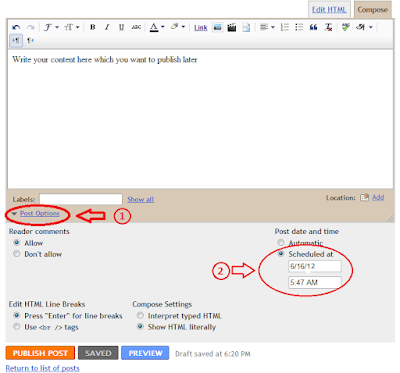
Well now let me explain how to do this. I have used some screenshots to explain it very clearly.


1. First visit your blog Dashboard >> New Post

2. Then give your post a title and write down your content of the post

3. Now go to the bottom of the page and press on “Post Options” as I shown in following screen shot.


12 Things That Will Kill Your Blog Post Every Time


Blogging is a lot like fishing. Some people do it all the time and never catch anything…while others catch everything.

Why is that? You know better than to say it is luck.

So let’s call it what it is…when you look around at successful blogs…whatever industry or topic…there are several undeniable basics to success.

And it starts with blog posts that kill it…rather than get killed. But what kills a blog post? Here’s a list of 12 things…ignore them and you will have a tough time being successful.

1. Crafting cute, clever or confusing headlines (or really bad ones)

Your headline is going to appear in many places. At the top of your post…


In search engine page results…

Easy How to create a Blog using blogger.com

Image representing Blogger as depicted in Crun...


Blogs are another kind of website. You can create it and also organized it’s content. If you are looking to create your own personal blog using Blogger.com, here is a step by step introduction to get you started & learn how to register for an account, pick your blog name, design your page and create blog entries with photos, hyperlinks and various fonts.

Follow the next step and create a blog.

WHAT HAPPENS WHEN YOU NOT UPDATE YOUR BLOG

English: An icon from the Crystal icon theme. ...


As you all know that, sometimes the bloggers need to take break from blogging. If blogger are taking short break, then you have a option for creating schedule posts in advance. But sometimes its not possible to make schedule posts, so what happens to your blog when you stop blogging.
blogger image What happens when you not update your Blog
You will notice the following things on your blog.
1. Traffic coming from search engines will be decreased slightly.
2. Increased in spam comments.
3. Request from your RSS feed will be decreased.