Showing posts with label LinkedIn. Show all posts

Monday, 25 February 2013

Add a tweet button in your blog.


Add a tweet button in your blog.
Adding the Tweet button to your blog is a very simple process. Just navigate to the Tweet button page, and then follow these steps:

Step-1
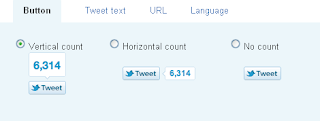
There are three options for button layout, two of which include the tweet count. Select anyone one button for add blog.


Step-2
This is completely new – after people use the Tweet button on your site, they will see who you’ve recommended they follow. The first account you should list is your own Twitter account; then you can also add another account to recommend. Perhaps in this space, you could add your company’s Twitter handle, an official blog Twitter handle, or a coworker/mentor. Or leave it blank.


 Step-3
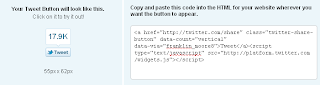
Copy this HTML code
 

Blogging Basics – Tweet With Style


Most bloggers want their posts to stand out and become a shining example of whatever topic they are writing about. If a blogger wants their message heard, amplification is the name of the game. When I began blogging I immediately began reading everything I could find on what amplification is and how it works.

Amplification:
A hand holding a Samsung phone. Tweetcaster is on the screen and they are getting ready to tweet. 
A statement, idea or narrative expanded beyond your website.

The basic idea of using various amplification techniques is to help get your message into the “sight” of more people.

Twitter is one of my favorite amplification tools but a tweet does not do any good if no one ever reads it. Any blogger knows that there is never-ending stream of tweets. Learning to use twitter effectively is one of the blogging basics.