Showing posts with label HTML. Show all posts

Sunday, 3 March 2013

How to Make Your WordPress or Blogger Blog DoFollow


How to Make Your WordPress or Blogger Blog DoFollow

What does becoming DoFollow mean? It simply means that you are allowing each commenter’s links in your comments section to be nofollow free. It is like a reward to the people who take the time to leave a comment on your website, allowing their links to be fully useful when search engines crawl your post.
So how do you make your blog DoFollow?
Self-Hosted WordPress Blogs
For self-hosted WordPress users, it is pretty easy. Simply go to your Dashboard > Plugins > Add New and search for DoFollow. You should receive a list of current DoFollow plugins that you can simply install and activate. Once activated, these plugins automatically make all of the commenters’ links (past and future) DoFollow.

Saturday, 2 March 2013

How to Make an SEO Burrito


How to Make an SEO Burrito
What does it take to make a truly great burrito? A good tortilla and a fantastic pot of refried pinto beans is a good start, but where is the flavor? Where is the spice? Making a heartstoppingly good burrito takes a little extra work and a lot of different ingredients. And that’s just like SEO.
Search engine optimization isn’t just about checking off the box on a few website updates and calling it good. That’s like filling a piping hot tortilla with some guacamole and calling it a burrito. It just doesn’t work, and you can’t sell a burrito like that to anyone who knows what a real burrito looks and tastes like.
Evolving SEO

Friday, 1 March 2013

Basic SEO for Bloggers


Basic SEO for Bloggers

Most of us understand how to search online. For more than a decade, we have relied on websites like Google and Yahoo to sift through the billions of web pages and present a list of contenders that, according to the search engines, most accurately relate to our search query.

Search Engines for President

We understand how to search. What we don’t always understand is how to be found. (How to be found by humans, that is. Google will find you. Oh yes, it will.) Search engines, after all, are merely indexes of the many websites that the Google or Bing bots discover – or as we say, crawl. Without these search engines, your readers/customers/etc. would only be able to find your site (1) by typing in the exact URL in the address bar or (2) by clicking on a link to your site from another site. Without search engines, we would be so lost. Thank goodness for those bots that crawl all over HTML to understand the quality of a website as well as for which terms it should rank organically.

SEO at its core

It’s critical to understand the workings of search engines as much as possible because they control how many users will be exposed to your website. Search Engine Optimization (SEO) is really all about enhancing a website so that the search bots can find it more easily and, as mentioned, identify which terms it should rank for.

Tuesday, 26 February 2013

Battle of Blogging Titans: WordPress vs. Blogger

Battle of Blogging Titans: WordPress vs. Blogger:


WordPress and Blogger – if you have been an ardent blogger, you probably have heard these two names zillions of times. And you might be aware of the battle of these titans as well. Being posed with two of the most popular blogging platforms, bloggers are at time perplexed with the big question- which is superior of both the blogging platforms? Both platforms offer a plethora of benefits but if you have recently ventured into the blogging arena then probably you are awaiting for an answer to choose a favored platform to write upon.


Why SEO certification is a horrible idea

Why SEO certification is a horrible idea:


Most people don’t know this about me, but I have a master’s degree in Counseling Psychology, and I even had a private practice for a few years. While I think I was pretty good at it, I wasn’t cut out to listen to people’s problems every day (and maintain a professional demeanor). Throughout that short career I was always bothered by industry certifications and their dual-relationship with state and federal politics.

I recently read about a survey meant to see if a third-party certification for SEO is feasible. I can only hope the answer is no, and I’m going to tell you why.

Monday, 25 February 2013

Migrating from Blogger to WordPress


Hey everyone! 

This all feels so strange. After 4 years of dedication to Blogger, I have decided to make the leap (..slow, tedious dragging of my feet) to WordPress. It was extremely agonizing at first – mostly because I was so terrified of losing content but also because I didn’t want to lose any my followers or my SEO rankings.

But I put my big girl pants on and here we are! Starlit Corner* on WordPress. HOORAY! 

First things first.

Content transfer is pretty easy because both Blogger and WordPress allow for easy export/import. So if you’re thinking about migrating like me, don’t worry too much about that. When it comes to picking a theme, remember that you can’t customize the width of your columns in most themes so pick carefully! Especially if you’ve uploaded photos – I found that some themes would cut off my photos or change the image size and distort the picture.

Step by step.

1. Open a WordPress account and set up your profile and domain.

2. In your dashboard, navigate to ‘Tools’ and select ‘Import’.

3. Select the ‘Blogger’ option and authorize permission for WordPress to collect and copy your files.

4. A list of your Blogger blogs should appear and you select which you would like to import.

Now the difficult part. Obviously when you transfer your blog, your links change and you lose your stats and Google rankings.

I have found a couple websites showing me how to redirect traffic from my Blogger page to here but I want to be sure about it before I start fiddling with the HTML template. So if anyone knows of a reliable site to direct me, I would reeeeally appreciate it.

Add a tweet button in your blog.


Add a tweet button in your blog.
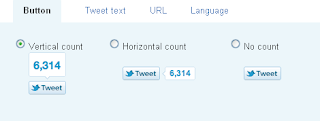
Adding the Tweet button to your blog is a very simple process. Just navigate to the Tweet button page, and then follow these steps:

Step-1
There are three options for button layout, two of which include the tweet count. Select anyone one button for add blog.


Step-2
This is completely new – after people use the Tweet button on your site, they will see who you’ve recommended they follow. The first account you should list is your own Twitter account; then you can also add another account to recommend. Perhaps in this space, you could add your company’s Twitter handle, an official blog Twitter handle, or a coworker/mentor. Or leave it blank.


 Step-3
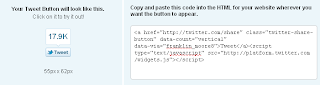
Copy this HTML code